
Troubleshooting guide | Checked November 2026
Mistfall Hunter Fatal Error: Launch Crash Fixes
Mistfall Hunter fatal error troubleshooting: verify files, compare PC requirements, update drivers, isolate overlays, and report reproducible crashes without guessing.
Quick answer: use a safe order, not a random fix list
If Mistfall Hunter shows a fatal error, crashes during shader preparation, or closes before you reach the menu, start with reversible checks: restart Steam and Windows, verify the game files, compare your PC with the current Steam requirements, and update Windows plus the graphics driver. Change one thing at a time so you can tell which action changed the result.
The phrase error 0x4 appears in community-shaped searches, but the official pages checked for this guide do not publish a stable meaning for that code. Treat the number as a report label, not a diagnosis. Do not delete folders, install an unofficial DLL, disable security tools permanently, or download a repair package because a forum post promises a one-click fix.
This page separates official facts from community hypotheses. Steam is the source for the current PC requirements and file-management instructions; the official Mistfall Hunter site is the source for game identity and first-party media. Crash patterns from Reddit, Steam Community, or videos can suggest what to test, but they are not proof that your machine has the same cause.
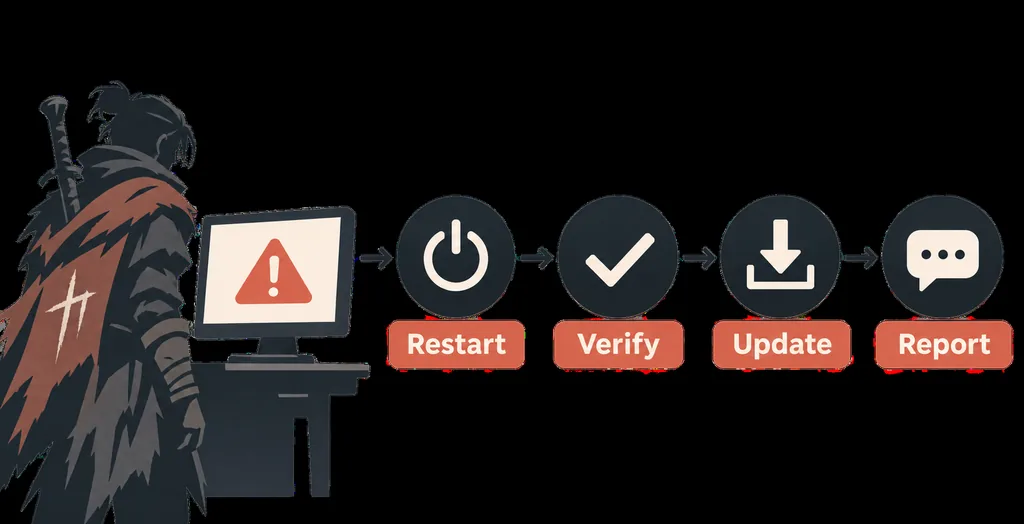
Match the symptom to the next check
| Symptom | First check | What not to assume |
|---|---|---|
| Fatal error before the menu | Restart Steam, then verify files and record the exact message | The code alone does not identify a fix. |
| Crash during shaders | Leave disk headroom, update the GPU driver, and remove overlays for one test | A shader crash is not automatically a network problem. |
| Closes in a run | Compare local stability, temperatures, and recent changes | A single crash does not prove the class, map, or server caused it. |
| Error 0x4 | Capture the full text, time, platform, and log context | No official page checked here defines 0x4. |
- 1 Restart Close the game and Steam, then reboot if the failure repeats.
- 2 Verify Use Steam's file-integrity check before replacing files.
- 3 Update Apply current Windows and GPU-driver updates, then retest.
- 4 Report Send the exact message and reproducible steps to the right support channel.
Keep the loop reversible. If a step changes the symptom, write it down before trying another change.
Step-by-step triage for a launch crash
1. Reproduce once and write down the boundary. Does the crash happen when launching, while compiling shaders, at the first loading screen, after an invite, or only in a particular run? Note the date, Windows version, GPU model, driver version, RAM, free storage, display mode, and whether an overlay or capture tool was open. A short record prevents you from testing five unrelated fixes at once.
2. Restart the smallest useful scope. Close Mistfall Hunter and Steam, wait for the processes to exit, then launch Steam again. If the same fatal error returns, restart Windows before changing files. If the problem disappears, do not declare it solved forever: record that a clean session changed the result and watch for a repeat.
3. Verify the installation through Steam. The official Steam Support flow can check local file integrity and reacquire a damaged file. Let it finish, then launch once with the same settings. Do not copy a DLL from a download site or replace a game file with a community upload. If verification reports a change, keep the report because it helps explain why the first launch failed.
4. Compare the actual machine with the official table. The current Steam listing names Windows 10 64-bit, 12 GB RAM, GTX 1060 or RX 580 class graphics at minimum, DirectX 12, broadband internet, and 45 GB available storage; the recommended row is higher. These are compatibility rows, not a promise of FPS. A nearly full drive, a laptop GPU with a lower power limit, or an old driver can still make a borderline setup unstable.
5. Isolate graphics and overlays for one controlled test. Update Windows and the GPU driver from the vendor, close recording or overlay layers you do not need, and try a conservative display mode. Change only one variable, then use the same launch path. If the crash moves from shader preparation to the menu, that is useful evidence; it is not proof that a single setting is the permanent cause.
6. Separate local failure from network failure. A game that closes before the menu points first to local files, drivers, memory, storage, or the client. A disconnect after the menu may involve servers, routing, or account state. Do not solve a local fatal error by changing DNS at random, and do not blame the GPU for a server timeout. Test offline-looking launch steps separately from matchmaking steps.
What is confirmed, and what remains a hypothesis
Confirmed by the checked official sources: Steam publishes the PC requirements and provides the store/support path for the game; the official Mistfall Hunter site describes the game and publishes first-party media. Those sources do not publish a universal 0x4 definition, a guaranteed shader workaround, or a promise that a reinstall fixes every launch crash.
Community reports can still be useful. If several players report the same driver version, overlay, or shader boundary, treat that as a testable lead. Match their hardware, patch date, and reproduction step before applying the advice. A Reddit comment, video title, or search snippet is not a verified support bulletin.
Stop experimenting when the game launches reliably, when a change risks your files or security, or when the symptom points to an account or service issue that only the developer or platform can inspect. Keep the exact message and contact route ready instead of escalating to unsafe downloads.
Build a useful crash report before asking for help
Include the exact on-screen text, a screenshot if it contains no private data, the time and time zone, Steam build or update context, Windows version, CPU, GPU and driver, RAM, free storage, display mode, and whether overlays were enabled.
Describe the shortest repeatable path: launch Steam, press Play, reach shader preparation, then the error. Say which official steps you already tried and what changed. Avoid posting account tokens, full email addresses, or unrelated personal files. A compact report is more actionable than a list of ten guesses.
Mistfall Hunter fatal error FAQ
Why does Mistfall Hunter show a fatal error on launch?
Possible causes include damaged local files, an outdated driver, insufficient headroom, an overlay conflict, or a service/account problem. The message alone does not prove which one applies. Follow the reversible order on this page and record the boundary.
How do I fix a Mistfall Hunter crash during shaders?
Update Windows and the GPU driver, close overlays for one test, keep free disk space, and verify files through Steam. Treat those as controlled checks, not a guaranteed shader fix. If it repeats, record the GPU, driver, patch date, and exact phase.
What does Mistfall Hunter error 0x4 mean?
The official pages checked here do not define a stable 0x4 meaning. Capture the complete message and report it with your platform and reproduction steps instead of downloading a DLL or claiming a specific cause.
Should I reinstall Mistfall Hunter?
Reinstalling is a later, reversible decision only after verifying files, checking storage, and ruling out driver or overlay changes. A reinstall cannot repair a Windows, GPU, account, or server issue, so keep your report before removing anything.
Can I use a community crash fix?
Use a community post as a hypothesis and compare its patch date and hardware with yours. Avoid unofficial executables, DLLs, trainers, registry cleaners, and instructions that permanently disable security protections.
Does this guide cover Xbox or PS5 fatal errors?
The primary keyword and steps target the PC/Steam launch path. Console users should use the platform's current support flow and the site's PS5 or crossplay guide for platform context; do not apply PC file-verification steps to a console.
Will a fatal error delete my character or gear?
A launch crash does not by itself prove a save or inventory loss. Do not infer a progression reset from the error screen. Check the current client and official support path, and report any reproducible loss with the run time and account-safe details.